Compiling and Installing IvorySQL on Linux

IvorySQL can be built on Linux, OSX, Unix, and Windows platforms, and is basically the same as PostgreSQL compiled and installed. This article describes the steps for compiling source code on a Linux-based system.
Preparation
1.1 Obtaining the IvorySQL source code
For Windows or Linux, if you have Git installed, you can use git to download:
git clone https://github.com/IvorySQL/IvorySQL.git
git clone https://gitee.com/IvorySQL/IvorySQL.git
Or go directly to Github or Gitee to download:
https://github.com/IvorySQL/IvorySQL
https://gitee.com/IvorySQL/IvorySQL
Github can be a bit slow, use it if it works, and switch to Gitee if it doesn't.
As of this writing, the latest release of IvorySQL is 1.2, released on February 28, 2022.
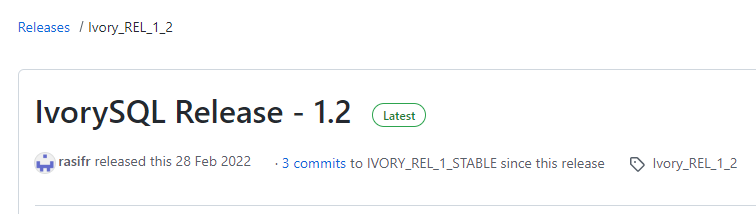
The source version used in this article is also IvorySQL 1.2.
1.2 Installing the dependency packages
To compile IvorySQL from source, you must ensure that a prerequisite packages are available on your system.
Run the following command to install related packages:
sudo yum install -y bison-devel readline-devel zlib-devel openssl-devel wget
sudo yum groupinstall -y 'Development Tools'
Note: "Development Tools" includes GCC, make, Flex, bison.
Compilation and installation
The source code obtained in front of the folder IvorySQL, next we will enter this folder for operation.
2.1 configuration
Run the following command as the Root user:
./configure
Note: Since --prefix is not provided, /usr/local/pgSQL will be used as default installation path.
To use a different installation path, such as "/ usr/local/ivorysql/ivorysql - 1.2" :
./configure --prefix=/usr/local/ivorysql/ivorysql-1.2
For more configure parameters, try ./configure --help. Also check out the PostgreSQL manual.
2.2 Compilation and Installation
After the configuration is complete, run make to compile:
make
To test the newly compiled service using regression tests before installing it, use either of the following commands:
make check
make check-world
Then install:
make install
Initialize the database service
We only have a simple configuration here, can be local and remote connection is ok.
3.1 Creating an OS User
In the root session, create user ivorysql:
/usr/sbin/groupadd ivorysql
/usr/sbin/useradd -g ivorysql ivorysql -c "IvorySQL1.2 Server"
passwd ivorysql
3.2 Creating a Data Directory
Next you need to create the data directory and change the permissions. Run the following command in the root session.
mkdir -p /ivorysql/1.2/data
chown -R ivorysql.ivorysql /ivorysql/1.2/
**Note: The data directory is not placed in "/var/lib/ivorysql/ivorysql-1/data" when you do installation using the RPMs.
3.3 Environment Variables
Switch to ivorysql user, modify the /home/ivorysqL/. bash_profile file, and configure environment variables:
umask 022
export LD_LIBRARY_PATH=/usr/local/pgsql/lib:$LD_LIBRARY_PATH
export PATH=/usr/local/pgsql/bin:$PATH
export PGDATA=/ivorysql/1.2/data
Make environment variables take effect in the current IVorysQL user session:
source .bash_profile
You can also log in again or start a session with a new user ivorysQL.
3.4 Configuring the Firewall
If the firewall is enabled, port 5333 needs to be opened:
firewall-cmd --zone=public --add-port=5333/tcp --permanent
firewall-cmd --reload
Note: The default port is 5333. If this port is disabled, external clients will not be able to connect to the IP address.
3.5 the initialization
In user ivorysql, simply execute initdb to complete the initialization:
initdb
Note: InitDB operates in the same way as PostgreSQL, and can be initialized in the same way as PG.
3.6 Starting the Database
Use pg_ctl to start the database service:
pg_ctl start
Check the status, the startup is successful:
pg_ctl status
pg_ctl: server is running (PID: 29549)
/usr/local/pgsql/bin/postgres
Configure services
Here is a simple configuration, can be local and remote connection is ok
4.1 Client Authentication
Add the following information to /ivorysql/1.2/data/pg_hba.conf:
host all all 0.0.0.0/0 trust
Note: this is trust, which means you can log in without secret.
Run the following command to load the configuration:
pg_ctl reload
4.2 Basic Parameters
Connect to database through PSQL:
psql
Modify listening address:
alter system set listen_addresses = '*';
Note: By default the server does not allow connections from external hosts.
Restart the service for the Settings to take effect:
pg_ctl restart
4.3 Daemon Service
Create service file:
touch /usr/lib/systemd/system/ivorysql.service
The edited content is as follows:
[Unit]
Description=IvorySQL 1.2 database server
Documentation=https://www.ivorysql.org
Requires=network.target local-fs.target
After=network.target local-fs.target

[Service]
Type=forking

User=ivorysql
Group=ivorysql

Environment=PGDATA=/ivorysql/1.2/data/

OOMScoreAdjust=-1000

ExecStart=/usr/local/pgsql/bin/pg_ctl start -D ${PGDATA}
ExecStop=/usr/local/pgsql/bin/pg_ctl stop -D ${PGDATA}
ExecReload=/usr/local/pgsql/bin/pg_ctl reload -D ${PGDATA}

TimeoutSec=0

[Install]
WantedBy=multi-user.target
Note: There are many ways to write service. Be careful when using it in the production environment. Repeat the test several times.
Stop the database service started by pg_ctl, enable the systemd service, and start:
systemctl enable --now ivorysql.service
IvorSQL Database service operation commands:
systemctl start ivorysql.service			--启动数据库服务
systemctl stop ivorysql.service				--停止数据库服务
systemctl restart ivorysql.service			--重启数据库
systemctl status ivorysql.service			--查看数据库状态
systemctl reload ivorysql.service			--可以满足部分数据库配置修改完后生效
Database Client
The IvorySQL client is the same as the PostgreSQL client.
5.1 PSQL connection
Connecting from ivorysql OS user:
[ivorysql@Node02 ~]$ psql
psql (15devel)
Type "help" for help.

ivorysql=#
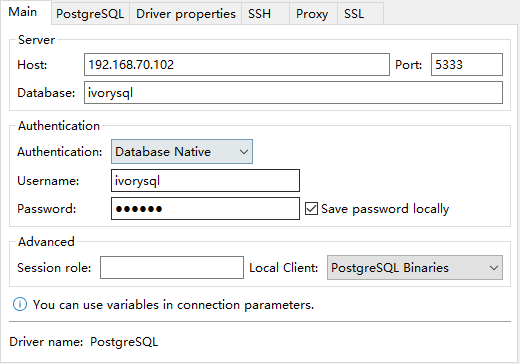
5.2 DBeaver connection
DBeaver is a powerful open source tool with the following connectivity configurations:
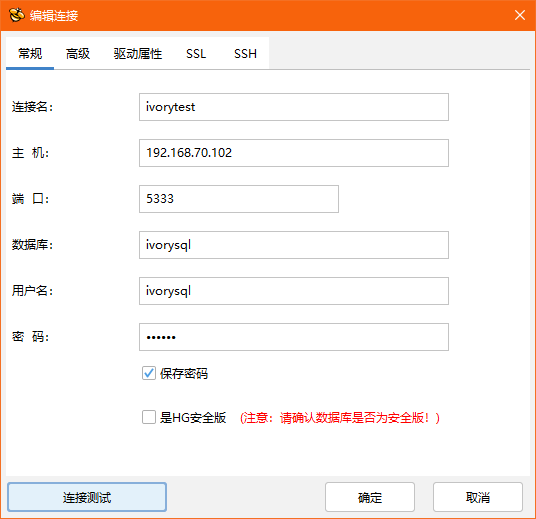
5.3 Connect using HighGo Developer
HighGo Developer is a tool independently developed by Highgo, which supports not only Highgo database, but also PostgreSQL and IvorySQL database. The connection configuration is as follows:
Uninstall
If required IvorySQL can be uninstalled by compiling and uninstalling.
6.1 Backing Up Data
The data directory is under "/ ivorysQL /1.2/data", so we can protect the directory, It is recomended to stop the database service and make a backup.
6.2 Compilation and Uninstallation
Switch to the source directory and run the following commands:
make uninstall
make clean
Delete residual directories and files:
systemctl disable ivorysql.servicemake					--Disable the service
mv /usr/lib/systemd/system/ivorysql.service /tmp/		--delete or move the service file to /tmp
rm -fr /usr/local/pgsql									--Remove the installed files
The ivorysql user and the corresponding environment variables can be cleared according to the situation.
The rest is the data directory "/ ivorysQL /1.2/data", please be sure to take a backup before processing.
There are installed dependency packages, you can decide whether to uninstall according to the situation.
Postscript
-
For more detailed operations, see PostgreSQL.
-
You can also refer to the IvorySQL source code under the documentation: /root/ivorysql/readme.md.
-
You can also open a link to the website:
-
If you have any question, welcome to the official community IvorySQL warehouse: github.com/IvorySQL/IvorySQL submit issue.
Join the IvorySQL community by subscribing to mailing lists:
Also, don't forget to give us a ⭐ on Github